

Description
ShareThis Follow Buttons helps you grow your audience by making it easy for visitors to connect with your social profiles across the web.
Display clean, responsive follow buttons anywhere on your WordPress site with a simple setup process and flexible customization options. The plugin is mobile friendly, lightweight, and designed to work seamlessly with modern WordPress themes.
With just a few clicks, you can add social follow buttons that encourage visitors to engage with your brand across popular social platforms.
Features
- Fast and simple installation
- Mobile responsive design
- Easy configuration inside WordPress
- Connect to existing ShareThis properties
- Lightweight and optimized for performance
- Compatible with modern WordPress themes
- Gutenberg block support
- Supports a growing list of social networks
Supported Social Networks
- Twitter / X
- YouTube
- TikTok
- Bluesky
- Mastodon
- Truth Social
- Gettr
- Parler
- Strava
- ResearchGate
- Google Scholar
- And more
Better Together with Share Buttons
Increase engagement even further with the ShareThis Share Buttons plugin:
https://wordpress.org/plugins/sharethis-share-buttons
Share Buttons and Follow Buttons work seamlessly together and provide a complete social engagement solution for your website.
Existing ShareThis User?
If you previously installed ShareThis manually using embedded JavaScript, remember to remove any hardcoded ShareThis scripts and follow button containers after activating the plugin.
Privacy
By creating an account with ShareThis, you agree to our Terms of Use:
https://sharethis.com/publisher-terms-of-use/
ShareThis may collect interaction data related to button usage and engagement.
Read our Privacy Policy here:
https://sharethis.com/privacy/
Screenshots
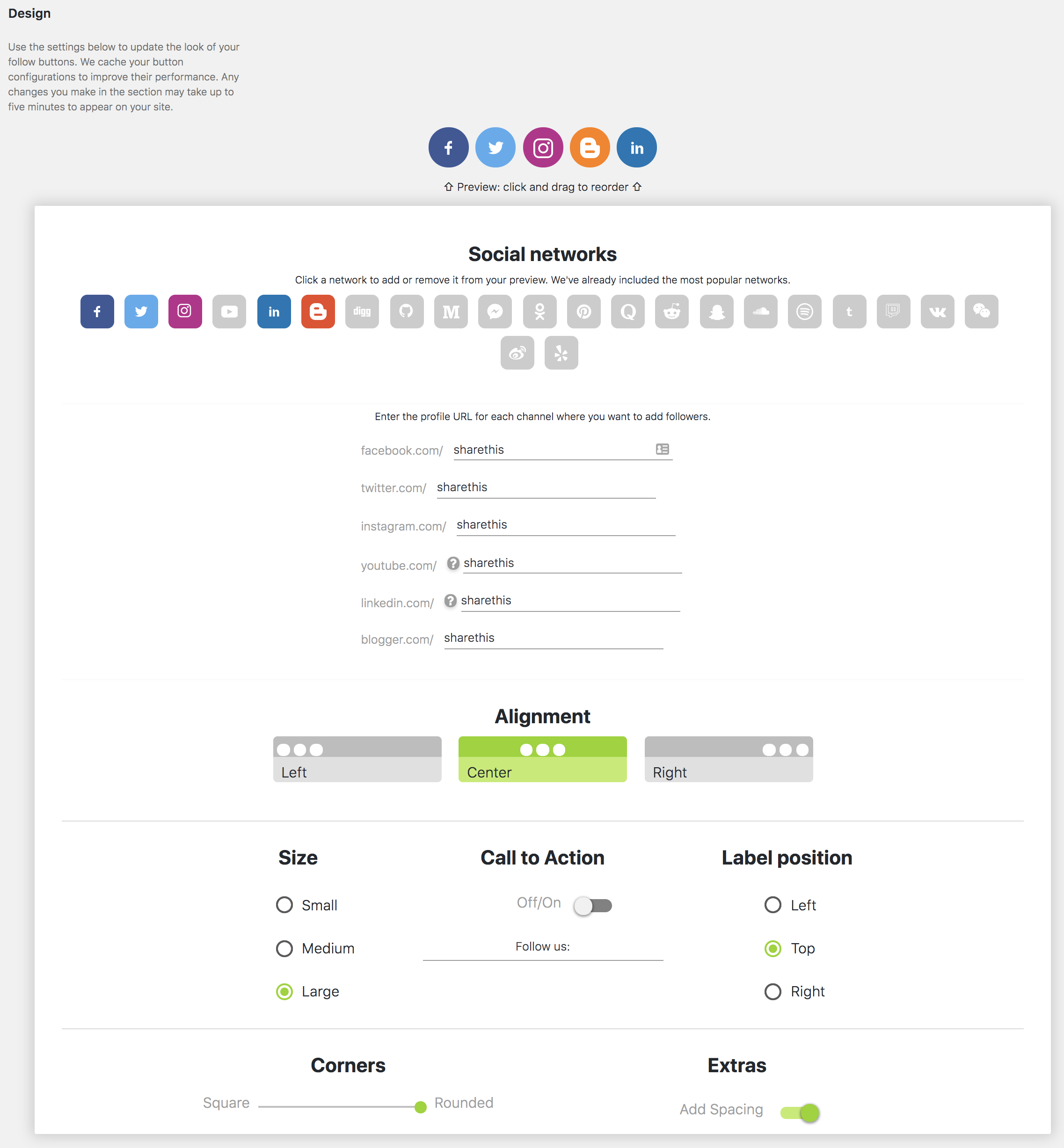
Set up your Follow Buttons 
Configure Follow Button settings 
Mobile responsive Follow Buttons
Blocks
This plugin provides 1 block.
- Inline Follow Buttons
Installation
- Download and install the plugin from the WordPress Plugin Directory or upload the plugin zip file manually.
- Activate the plugin through the WordPress Plugins menu.
- Open the ShareThis Follow Buttons settings page.
- Configure your social networks and button preferences.
- Save your settings and your Follow Buttons will appear on your site.
FAQ
-
Yes. ShareThis Follow Buttons are fully responsive and optimized for mobile devices, tablets, and desktops.
-
No. ShareThis Follow Buttons works as a standalone plugin.
-
Yes. During setup you can connect to an existing ShareThis property and automatically sync your settings.
-
Does the plugin support Gutenberg?
-
Yes. The plugin includes Gutenberg block support for adding Follow Buttons directly inside posts and pages.
-
Remove any manually embedded ShareThis JavaScript snippets and hardcoded Follow Button containers after activating the plugin to avoid duplicate buttons.
Reviews

Contributors & Developers
“ShareThis Follow Buttons” is open source software. The following people have contributed to this plugin.
Contributors


Translate “ShareThis Follow Buttons” into your language.
Interested in development?
Browse the code, check out the SVN repository, or subscribe to the development log by RSS.
Changelog
1.4.8
- Test wp ver 7.
1.4.7
- Add truthsocial, gettr, parler, strava, google scholar, mastodon, research gate
- Remove skype.
- Refresh readme.
1.4.6
- Test wp ver 6.9.
- Sanitize settings.
- Fix text domain.
1.4.5
- Fix text domain error.
- Test with wp ver 6.8.2
1.4.4
- Add bluesky network
1.4.3
- test wp ver 6.7.1.
1.4.2
- Fix deprecation errors.
- test wp ver 6.5.2.
1.4.1
- Fix admin enqueue
1.4.0
- Add new social networks
- Fix menu loading issue.
1.3.2
- Fix style enqueue.
1.3.1
- Test with WordPress 6.1.1.
1.3.0
- Remove registration.
1.2.4
- Add source.
1.2.3
- Tested with WordPress 6.0.2.
1.2.2
- Tested with WordPress 5.9.1.
- Sanitize inputs/outputs and make sure code is up to standard.
1.2.1
- Tested with WordPress 5.8.
1.2.0
- Fix config functionality in register and admin.
1.1.4
- endpoint update fix.
1.1.3
- Replace api endpoint.
1.1.2
- Fix is_plugin_active error
1.1.1
- Add: Brand new gutenberg block to insert follow buttons in a post.
- Test: Tested functionality in new WordPress 5+.
1.0.1
- Add: Added Flipboard and Google+ buttons to network list.
1.0.0
- Brand new plugin submission.